Building a scrum toolkit for retrospectives and planning poker
React, TypeScript, WebSockets, and way too much caffeine

The Beginning: Conceptualising the Scrum Toolkit
A few days ago with a friend, we decided to create a unified (all-in-one) tool for scrum masters that would connect the most important features for leading retrospectives, giving kudos, and planning poker sessions.
The idea came from my team experience with a tool called Scrumlr. It’s a great tool, but it’s missing several features such as voting locks, avatar management for people without accounts, and better grouping/ungrouping of cards. We were also using planning poker and had recently decided to start giving kudos - a way to say “thank you”. Various processes and ceremonies required various tools. All the tools we’d been using were as generic as possible to match many common problems of corporates around the world, but they didn’t match our specific problems in detail.
This comprehensive post will show the entire process of working on this side project. I’ll explain the mechanics and some of the trickier or more interesting code and design aspects. Let’s dive in!
Initial Design and Planning
The last few weeks after my main job I have been working with a friend on various topics related to our upcoming scrum toolkit. My friend was responsible for the design, and because he is mastering Figma, he made several screens with propositions of what it might look like.
The first few designs looked too similar in my opinion to other great, already existing tools on the market, so we pivoted the design from a classic, corporate blue-navbar-container-footer layout to a more distinctive one.
Our main colour was going to be sea green. Participants in the events were going to have colourful avatars (from the open source sensa emoji pack) that would be animated.

Also, I don’t like the idea of navbars because they take up too much space - so after discussion with my friend, he moved the settings and other important but non-crucial elements to a hidden sidebar.
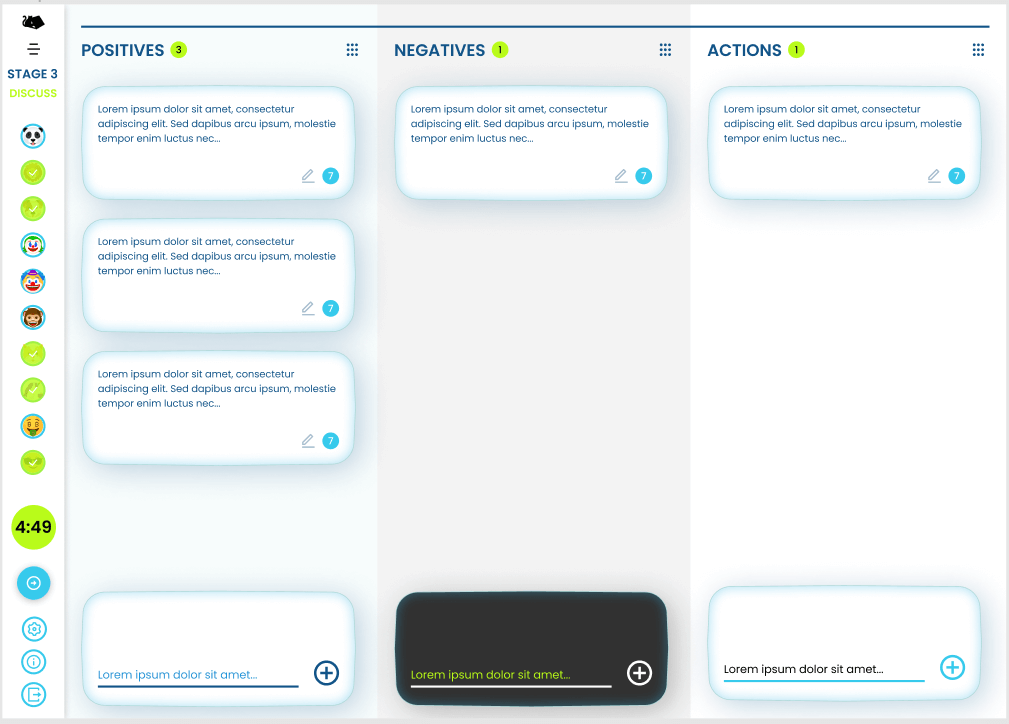
Currently, our app looks as follows:
Client-Side Architecture: React, TypeScript, and WebSocket Setup
It’s been a while since I wrote the last article about progress with Scrum Toolkit. 😀 Today I’m going to show you the setup for the client I made. The application is written in React using TypeScript. Communication with the backend is done via Socket.io with WebSocket transportation.
Application is using Redux for global app store. It’s matching paths via react-router and using react-dnd for card drag and drop. So setup of everything together in index.tsx:
root.render(
  <React.StrictMode>
    <BrowserRouter>
      <Provider store={store}>
        <DndProvider backend={HTML5Backend}>
          <App />
        </DndProvider>
      </Provider>
    </BrowserRouter>
  </React.StrictMode>,
);
App store in redux consists of four main entities: cards, users, votes and board. Board is the centre point and the user is per board. Each board can handle multiple users and cards. The card may be written by only one user and have multiple votes from the same or different users.
// cards state
export type CardsState = Array<RawCard>;

// config state
export type ConfigState = {
  localUser: RawUser;
  board: {
    boardId: string;
    stage: number;
    timerTo: number;
    maxVotes: number;
    mode: string;
  };
  users: Array<RawUser>;
  socket: Socket | null;
};
Where raw entities are:
export type RawVote = {
  id: string;
  userId: string;
};

export type RawUser = {
  id: string;
  nickname: string;
  avatar: number;
  isReady: boolean;
  selectedPlanningCard: number;
};

export type RawCard = {
  id: string;
  stackedOn: string;
  content: string;
  userId: string;
  column: number;
  votes: RawVote[];
  createdAt: number;
};
Communication with API is done with socket.io. I wrote a custom hook to connect, register handlers and manage socket handlers with “Socket Manager”.
export type SocketHook = {
  connect: (nickname: string, avatar: number, boardId: string) => void;
  socket: Socket<IncomingEvents, OutgoingEvents> | null;
};

export function useSocket(): SocketHook {
  const socket = useAppSelector((state) => state.config.socket);
  const dispatch = useAppDispatch();
  const navigate = useNavigate();

  function connect(nickname: string, avatar: number, boardId: string) {
    if (socket?.connected) {
      socket.disconnect();
    }

    const newSocket: Socket<IncomingEvents, OutgoingEvents> = io('http://localhost:3001', { transports: ['websocket', 'polling'] });

    newSocket.on('connect', () => {
      newSocket.emit('Join', {
        nickname,
        boardId,
        avatar,
      });

      dispatch({
        type: actions.config.SetNickname,
        payload: {
          nickname,
        },
      });

      dispatch({
        type: actions.config.SetBoardId,
        payload: {
          boardId,
        },
      });
    });

    registerUsersHandlers(newSocket, dispatch, navigate);
    registerBoardsHandlers(newSocket, dispatch);
    registerCardsHandlers(newSocket, dispatch);

    dispatch({
      type: actions.config.SetSocket,
      payload: {
        socket: newSocket,
      },
    });
  }

  return { connect, socket };
}
Every handler accepts a socket where we register listeners for specific events. Thanks to this approach, it’s easy to maintain multiple events. The client responds to events by dispatching the incoming event to reducers.
import { Socket } from 'socket.io-client';
import { IncomingEvents, OutgoingEvents } from './events';
import { RootDispatch } from '../utils/store';
import actions from '../actions';

function registerCardsHandlers(
  socket: Socket<IncomingEvents, OutgoingEvents>,
  dispatch: RootDispatch,
) {
  socket.on('CardState', (data) => {
    dispatch({
      type: actions.cards.SetOneCard,
      payload: {
        card: data.card,
      },
    });
  });

  // ...
}

export default registerCardsHandlers;
Board is a simple container component that holds all the common logic for the board. Depending on board mode can open Retro or Planning view.
On initial load, the app is trying to get a nickname and avatar from local storage using a hook. If it fails, then generate a nickname for the user and pick a random avatar. Both information can be changed later.
function Board() {
  const { id } = useParams<{ id: string }>();
  const navigate = useNavigate();
  const [isNavbarOpen, setIsNavbarOpen] = useState(false);
  const socketController = useSocket();

  const [nickname, setNickname] = useLocalStorage<string>(
    'nickname',
    `Guest${Math.floor(Math.random() * 10000)}`,
  );

  const [avatar, setAvatar] = useLocalStorage<number>(
    'avatar',
    Math.floor(Math.random() * 89),
  );

  useEffect(() => {
    if (!socketController.socket?.connected) {
      if (!id) navigate('/');

      socketController.connect(nickname, avatar, id || '');
    }

    return () => {
      socketController.socket?.disconnect();
    };
  }, []);

  const localUser = useAppSelector((state) => state.config.localUser);
  const board = useAppSelector((state) => state.config.board);

  const [isUserModalOpen, setIsUserModalOpen] = useState(false);
  const [userModalNickname, setUserModalNickname] = useState('');
  const [userModalAvatar, setUserModalAvatar] = useState(0);

  const handleUserModalOpen = () => {
    setUserModalNickname(localUser.nickname);
    setUserModalAvatar(localUser.avatar);
    setIsUserModalOpen(true);
  };

  const handleUserModalSave = () => {
    if (!userModalNickname) return;

    socketController.socket?.emit('ChangeUserData', {
      nickname: userModalNickname,
      avatar: userModalAvatar,
    });
    setNickname(userModalNickname);
    setAvatar(userModalAvatar);
    setIsUserModalOpen(false);
  };

  return (
    <div>
      <Sidebar
        isOpen={isNavbarOpen}
        onSidebarToggleClick={() => setIsNavbarOpen(!isNavbarOpen)}
        onChangeUserData={handleUserModalOpen}
      />
      {board.mode === 'retro' && <Retro />}
      {(board.mode === 'planning_hidden' ||
        board.mode === 'planning_revealed') && <Planning />}

      <UserModal
        isOpen={isUserModalOpen}
        avatar={userModalAvatar}
        nickname={userModalNickname}
        onSave={handleUserModalSave}
        onChangeAvatar={setUserModalAvatar}
        onChangeNickname={setUserModalNickname}
        onClose={() => setIsUserModalOpen(false)}
      />
    </div>
  );
}

export default Board;
The retro view displays in three columns cards of a different types. In the first stage, only own cards are visible, on the second all cards but only own votes and in the third stage all cards, all votes and the third column. This approach prevents users from preassuming or suggesting each other during writing tasks or voting.
Cards can be stacked, so when rendering we have to filter out all cards that are dependent on others (are in the middle or bottom of the stack). Here are all the handlers to manipulate card state, CRUD operations, upvoting, downvoting, stacking, unstacking etc.
const getCardsStack = (firstCardId: string, allCards: Array<RawCard>) => {
  const cardsStack: Array<RawCard> = [];

  let cardOnTopOfStack = allCards.find((card) => card.id === firstCardId);
  while (cardOnTopOfStack && cardOnTopOfStack.stackedOn !== '') {
    cardOnTopOfStack = allCards.find(
      // eslint-disable-next-line no-loop-func
      (card) => card.id === cardOnTopOfStack?.stackedOn,
    );
    if (cardOnTopOfStack) cardsStack.push(cardOnTopOfStack);
  }
  return cardsStack;
};

const getVotes = (
  card: RawCard,
  allCards: Array<RawCard>,
  boardStage: number,
  localUserId: string,
) => {
  let votesCount = card.votes.length;

  if (boardStage === 1) {
    votesCount = card.votes.filter(
      (vote) => vote.userId === localUserId,
    ).length;
  }

  if (card.stackedOn) {
    const stack = getCardsStack(card.id, allCards);

    if (boardStage === 1) {
      for (let i = 0; i < stack.length; i++) {
        const item = stack[i];
        votesCount += item.votes.filter(
          (vote) => vote.userId === localUserId,
        ).length;
      }
    } else {
      for (let i = 0; i < stack.length; i++) {
        votesCount += stack[i].votes.length;
      }
    }
  }

  return votesCount;
};

// ...

const cards = useAppSelector((state) => state.cards);
  const board = useAppSelector((state) => state.config.board);
  const localUser = useAppSelector((state) => state.config.localUser);

  const socketController = useSocket();

  const handleCardGroup = (cardId: string, stackedOn: string) => {
    socketController.socket?.emit('GroupCards', { cardId, stackedOn });
  };

// ...

{(!isMobile || selectedColumn === 0) && (
            <List
              id={0}
              type="positive"
              columnWidth={columnWidth}
              selectedColumn={selectedColumn}
              onChangeColumn={setSelectedColumn}
            >
              {cards
                .filter(
                  (card) =>
                    card.column === 0 &&
                    !cards.some(
                      (nestedCard) => nestedCard.stackedOn === card.id,
                    ),
                )
                .filter(
                  (card) => board.stage !== 0 || card.userId === localUser.id,
                )
                .sort((a, b) => {
                  if (board.stage !== 2) {
                    return b.createdAt - a.createdAt;
                  }
                  return b.votes.length - a.votes.length;
                })
                .map((card) => {
                  const votesCount = getVotes(
                    card,
                    cards,
                    board.stage,
                    localUser.id,
                  );

                  return (
                    <Card
                      key={card.id}
                      id={card.id}
                      content={card.content}
                      onDecreaseVote={() => handleDownvote(card.id)}
                      votesCount={votesCount}
                      onDelete={() => handleCardDelete(card.id)}
                      onEdit={() => handleCardEdit(card.id, card.content)}
                      onGroup={handleCardGroup}
                      onUngroup={handleCardUngroup}
                      onIncreaseVote={() => handleUpvote(card.id)}
                      stack={!!card.stackedOn}
                      displayVotes={board.stage !== 0}
                      color="success"
                      createdAt={card.createdAt}
                    />
                  );
                })}
            </List>
          )}
// ...
Each card register drag and drop with ref. They change opacity and border slightly to indicate it’s being a drag or over. Stacked cards are positioned to look like physical cards messed irregularly on deck.
Kudos on cards are done by looking for the word “kudos” whenever in the content. If it appears, then the background is changed to an animated meme gif. With this, the board look more engaging and interesting during the ceremony.
// ..

  const [{ isDragging }, drag] = useDrag(() => ({
    type: 'card',
    item: {
      id,
    },
    collect: (monitor) => ({
      isDragging: monitor.isDragging(),
    }),
  }));

  const [{ isOver }, drop] = useDrop(() => ({
    accept: 'card',
    drop: (item: { id: string }) => {
      onGroup(item.id, id);
    },
    collect: (monitor) => ({
      isOver: monitor.isOver(),
    }),
  }));

  const isKudos = content.toLowerCase().indexOf('kudos') > -1;
  const kudosHash = createdAt % 32;
  const kudosImage = `/kudos/q${kudosHash}.gif`;
  const kudosStyles = isKudos
    ? {
        backgroundImage: `url(${kudosImage})`,
        backgroundSize: 'cover',
        backgroundPosition: 'center',
      }
    : {};
  const cardColor =
    color === 'success' && !isKudos ? 'text-black' : 'text-white';

// ...

export default Card;
The planning view displays a set of cards regarding the Fibonacci sequence, where the next card is the sum of two previous. Two additional cards mean “I don’t know how to estimate” and “ceremony is too long”. After selecting a card it’s automatically changing the user state to ready so others know you have chosen the card and you are ready to reveal.
After revealing on the top you can see the average from numbered cards and a small prompt inspired by the “Knowledge is Power” game for PS4. The selected card is a little animated so you know what you choose and make the board more dynamic.
function Planning() {
  const socketController = useSocket();

  const localUser = useAppSelector((state) => state.config.localUser);
  const board = useAppSelector((state) => state.config.board);
  const users = useAppSelector((state) => state.config.users);

  const handleSetSelectPlanningCard = (selectedPlanningCard: number) => {
    socketController.socket?.emit('SetSelectedPlanningCard', {
      selectedPlanningCard,
    });
  };

// ...

  const cardsMap: Array<{
    number: number | undefined;
    icon: 'not sure' | 'break pls' | undefined;
  }> = [
    { number: 0, icon: undefined },
    { number: 1, icon: undefined },
    // ...
    { number: undefined, icon: 'not sure' },
    { number: undefined, icon: 'break pls' },
  ];

  const userVotes = users.filter((user) => user.selectedPlanningCard !== 0);

  const userVotesWithNumbers = userVotes.filter(
    (user) =>
      user.selectedPlanningCard !== 11 && user.selectedPlanningCard !== 12,
  );

  const sum = userVotesWithNumbers.reduce(
    (acc, user) => acc + (cardsMap[user.selectedPlanningCard].number || 0),
    0,
  );

  const average = Number((sum / (userVotesWithNumbers.length || 1)).toFixed(1));

  const comments = [
    'The voting is over.',
    'How did our players vote?',
    // ...
    'Time to check the valuation!',
  ];

  return (
    <ShiftedContent>
      <div className="vh-100 w-100 bg-planning overflow-y-auto">
        <div className="container d-flex align-items-center">
          <div className="row m-0 w-100">
            <div className="mt-5 col-12 col-lg-8 offset-lg-2 ">
              {board.mode === 'planning_hidden' && (
                <div className="d-flex flex-row flex-wrap justify-content-center">
                  {cardsMap
                    .filter((card) => card.number !== 0)
                    .map((card, index) => (
                      <PlanningCard
                        key={card.number}
                        number={card.number}
                        icon={card.icon}
                        selected={localUser.selectedPlanningCard === index + 1}
                        onClick={() => handleSetSelectPlanningCard(index + 1)}
                      />
                    ))}
                </div>
              )}
              {board.mode === 'planning_revealed' && (
                <div>
                  <div className="small text-white text-center">
                    {
                      comments[
                        (userVotesWithNumbers.length + sum + users.length) %
                          comments.length
                      ]
                    }
                  </div>
                  <h1 className="text-white text-center">{average}</h1>
                  <div className="d-flex flex-row flex-wrap justify-content-center">
                    {userVotes.map((user) => (
                      <PlanningCard
                        key={user.nickname}
                        number={cardsMap[user.selectedPlanningCard].number}
                        icon={cardsMap[user.selectedPlanningCard].icon}
                        voter={user.nickname}
                      />
                    ))}
                  </div>
                </div>
              )}
            </div>
            <div className="my-3 col-12 d-flex align-items-center justify-content-center">
              <button
                onClick={handleResetPlanning}
                type="button"
                className="btn btn-primary"
                disabled={board.mode === 'planning_hidden'}
              >
                Reset
              </button>
              <button
                onClick={handleRevealPlanning}
                type="button"
                className="ms-3 btn btn-success"
                disabled={board.mode === 'planning_revealed'}
              >
                Reveal
              </button>
            </div>
          </div>
        </div>
      </div>
    </ShiftedContent>
  );
}

export default Planning;
Final part of the client is sidebar. You can set timer to timestamp in the future, you can toggle your ready status, open user modal and see other participants. Sidebar can be wide and open or narrow and close.
// ...
  const users = useAppSelector((state) => state.config.users);
  const board = useAppSelector((state) => state.config.board);
  const localUser = useAppSelector((state) => state.config.localUser);

  const socketController = useSocket();

  const handleNextStage = () => {
    if (board.stage < 2) {
      socketController.socket?.emit('SetStage', {
        stage: board.stage + 1,
      });
    }
  };

  const handlePreviousStage = () => {
    if (board.stage > 0) {
      socketController.socket?.emit('SetStage', {
        stage: board.stage - 1,
      });
    }
  };

  const handleToggleReady = () => {
    socketController.socket?.emit('ToggleReady');
  };

  const handleChangeMaxVotes = (maxVotes: number) => {
    socketController.socket?.emit('SetMaxVotes', {
      maxVotes,
    });
  };

  const handleSetTimer = (duration: number) => {
    socketController.socket?.emit('SetTimer', {
      duration,
    });
  };

  const handleSetBoardMode = () => {
    socketController.socket?.emit('SetBoardMode', {
      mode: board.mode === 'retro' ? 'planning_hidden' : 'retro',
    });
  };

  const timerTo = useAppSelector((state) => state.config.board.timerTo);
  const [timer, setTimer] = useState('');

  const getDiffFormat = (diff: number) =>
    dayjs(dayjs(diff).diff(dayjs())).format('m:ss');

  useEffect(() => {
    setTimer(getDiffFormat(board.timerTo));

    const intervalHandler = setInterval(() => {
      setTimer(getDiffFormat(board.timerTo));
    }, 500);

    return () => {
      clearInterval(intervalHandler);
    };
  }, [timerTo]);

  const ref = useRef(null);
  useOnClickOutside(ref, onSidebarToggleClick);


// ...
That’s pretty much everything regarding the client aspect of the tool. The next part will be about the setup of the WebSocket in Node.js with TypeScript and TypeORM. Bye:)
Server-Side Architecture: Node.js, TypeScript, WebSockets, and TypeORM
In the previous section, we covered the setup for the client-side of the application. Now we are going to look closely at the server-side implementation. 🚀
The application API is written with the Express framework for file serving and WebSocket for communication. Here’s the entry file for the server:
// ...

dotenv.config();
const port = process.env.PORT;
const app: Express = express();
const server = http.createServer(app);

app.use(express.static(path.join(__dirname, 'public')));
app.get('(/*)?', async (req, res, next) => {
  res.sendFile(path.join(__dirname, 'public', 'index.html'));
});

AppDataSource.initialize().then(async () => {
  console.info('Database connected');
}).catch((error) => {
  console.error(error);
});

const io = new Server<IncomingEvents, OutgoingEvents, {}, User>(server, {
  transports: ['websocket', 'polling'],
});

io.on('connection', (socket: Socket<IncomingEvents, OutgoingEvents, {}, User>) => {
  registerUsersHandlers(io, socket);
  registerCardsHandlers(io, socket);
  registerBoardsHandlers(io, socket);
});

server.listen(port, () => {
  // eslint-disable-next-line no-console
  console.log(`Server is running at http://localhost:${port}`);
});
You can see we register events similar to what we did on client-side. That is because we are using the same set of events.
export type IncomingUsersEvents = {
  Join: (data: {boardId: string, nickname: string; avatar: number;}) => void;
  SetSelectedPlanningCard: (data: {selectedPlanningCard: number}) => void;
  ToggleReady: () => void;
  ChangeUserData: (data: {nickname: string, avatar: number}) => void;
}

export type OutgoingUsersEvents = {
  Joined: (data: {
    localUser: RawUser,
    users: RawUser[],
    cards: RawCard[],
    board: {id: string, stage: number, maxVotes: number, timerTo: number, mode: string},
  }) => void;
  UserState: (data: {user: RawUser}) => void;
  UsersState: (data: {users: RawUser[]}) => void;
}

export type IncomingCardsEvents = {
  CreateCard: (data: {content: string, column: number}) => void;
  UpdateCard: (data: {cardId: string, content: string}) => void;
  DeleteCard: (data: {cardId: string}) => void;
  GetCards: () => void;
  GroupCards: (data: {cardId: string, stackedOn: string}) => void;
  UngroupCards: (data: {cardId: string}) => void;
  UpvoteCard: (data: {cardId: string}) => void;
  DownvoteCard: (data: {cardId: string}) => void;
}

export type OutgoingCardsEvents = {
  CardState: (data: {card: RawCard}) => void;
  DeleteCard: (data: {cardId: string}) => void;
  CardsState: (data: {cards: RawCard[]}) => void;
}

export type IncomingBoardsEvents = {
  SetTimer: (data: {duration: number}) => void;
  SetBoardMode: (data: { mode: string }) => void;
  SetMaxVotes: (data: {maxVotes: number}) => void;
  SetStage: (data: {stage: number}) => void;
}

export type OutgoingBoardsEvents = {
  BoardConfig: (data: {board: {
    stage: number,
      timerTo: number,
      maxVotes: number,
      mode: string,
  }}) => void;
}

export type IncomingEvents = IncomingUsersEvents & IncomingCardsEvents & IncomingBoardsEvents;
export type OutgoingEvents = OutgoingUsersEvents & OutgoingCardsEvents & OutgoingBoardsEvents;
The handlers use these events as follows:
// ...

const registerCardsHandlers = (
  io: Server<IncomingEvents, OutgoingEvents, {}, User>,
  socket: Socket<IncomingEvents, OutgoingEvents, {}, User>,
) => {
  socket.on('CreateCard', async ({ content, column }) => {
    try {
      if (Joi.string().min(1).max(512).validate(content).error) {
        console.error(`CreateCard: Invalid content: ${content}`);
        return;
      }

      if (Joi.number().allow(0, 1, 2).validate(column).error) {
        console.error(`CreateCard: Invalid column: ${column}`);
        return;
      }

      const card = await Cards.create({
        content,
        column,
        board: {
          id: socket.data.boardId,
        },
        user: {
          id: socket.data.userId,
        },
        stackedOn: '',
        votes: [],
      }).save();

      io.to(socket.data.boardId || '')
        .emit('CardState', { card: getRawCard(card) });
    } catch (error) {
      console.error(error);
    }
  });
// ...

export default registerCardsHandlers;
To communicate with the backend, the server uses TypeORM. Initially, it was connecting to Postgres, but for my purposes this was overkill, so I switched to SQLite which is faster to provision, develop and maintain in this small app. If you want to switch back to Postgres, it’s just a matter of changing a few lines in the dataSource config.
import { DataSource } from 'typeorm';
import dotenv from 'dotenv';
import Boards from './Boards';
import Cards from './Cards';
import Users from './Users';
import Votes from './Votes';

dotenv.config();

const AppDataSource = new DataSource({
  type: 'sqlite',
  database: './db.sqlite',
  synchronize: true,
  logging: true,
  entities: [Boards, Cards, Users, Votes],
  subscribers: [],
  migrations: [],
});

export default AppDataSource;
Models are simple entity classes that extend TypeORM’s BaseEntity with some pre-made static methods to create and execute SQL queries.
export enum BoardMode {
  RETRO= 'retro',
  PLANNING_HIDDEN = 'planning_hidden',
  PLANNING_REVEALED = 'planning_revealed',
}

@Entity()
export default class Boards extends BaseEntity {
  @PrimaryGeneratedColumn('uuid')
    id: string;

  @OneToMany(() => Cards, (card) => card.board)
    cards: Cards[];

  @OneToMany(() => Users, (user) => user.board)
    users: Users[];

  @Column({
    type: 'integer',
    name: 'stage',
  })
    stage: number;

  @Column({
    type: 'integer',
    name: 'max_votes',
  })
    maxVotes: number;

  @Column({
    type: 'varchar',
    name: 'mode',
  })
    mode: string;

  @Column({
    name: 'timer_to',
  })
    timerTo: Date;

  @CreateDateColumn({
    name: 'created_at',
  })
    createdAt: Date;

  @UpdateDateColumn({
    name: 'updated_at',
  })
    updatedAt: Date;
}
TypeORM was a great choice for small API servers to use. And in comparison to Sequelize, it has much clearer syntax and works pretty well with TypeScript.
This post was originally published on Dev.to